

Making Your Own: How To Create An Auto Parts Website In WordPress
Hey there, fellow car lovers! Let’s talk about something super cool: building your very own website for selling auto parts or sharing your car knowledge. It’s like having your virtual garage where people can check out what you offer or learn from your expertise!
In this easy guide, we’ll show you how to use WordPress, a website-building tool, to make your dream site a reality. No techy jargon, just simple steps to get your online hub up and running smoothly.
So, if you’re ready to rev up your online presence and show the world what you’ve got, let’s dive in and create your own auto parts website!
Let’s dive in and get your online store up and running!
Create an auto-parts Website using the Zita site builder
Introduction: Zita Site Builder is an easy-to-use platform that enables users to create professional websites without the need for coding. It provides drag-and-drop functionality, customizable templates, and Rank Math optimization.
Combined with e-commerce integration and mobile responsiveness, it is a comprehensive online presence solution.
The benefits of creating an auto parts website in WordPress.
- User-Friendly Platform: WordPress is easy to use, allowing you to manage and update your website without extensive technical knowledge.
- Customization Options: There are numerous themes and plugins designed for e-commerce, enabling you to customize your site to fit your brand and product offerings.
- SEO Optimization: With the right strategies and plugins, you can optimize your website for search engines, driving more organic traffic to your online store.
- Security Features: WordPress offers robust security features, ensuring a safe and secure experience for both you and your customers.
- Payment Gateway Integration: The flexibility of WordPress allows you to integrate various payment gateways, making it convenient for customers to make purchases.
- Responsive Design: Your auto parts website will look great and function seamlessly across different devices, providing a positive user experience.
- Cost-Effective Solution: Creating an auto parts website in WordPress is an efficient and cost-effective way to reach a wider audience and grow your business in the competitive auto parts market.
Step 1: Navigate ‘Plugins’ and click on ‘Add new’.

Navigate to the ‘Plugins’ section in your WordPress dashboard and click on ‘Add New’ to access the plugin repository. This step allows you to explore and install new plugins tailored to your website’s needs, enhancing its functionality and user experience.
Step 2: Search for ‘Zita Site Builder’, then click on ‘Install Now’ and then ‘Activate’.

In the ‘Add Plugins’ section, search for ‘Zita Site Builder’. Once found, click on ‘Install Now’ to download the plugin, then click ‘Activate’ to enable its features. This step is essential as ‘Zita Site Builder’ offers customizable tools to design and modify your WordPress website’s layout and appearance seamlessly.
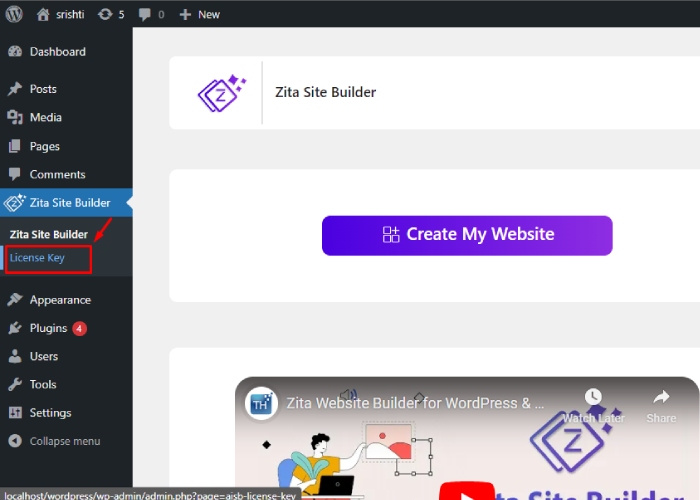
Step 3: Navigate to ‘Zita Site Builder’ and choose ‘Create My Website’.

To access the site builder, find it in the menu and click on it. Then, choose “Create My Website” to start building your site with Zita Site Builder.
After selecting “Create My Website,” you will be presented with a page containing various styles and theme designs to choose from.

If you’re interested in accessing additional features, you can upgrade to the Pro version of Zita Site Builder by clicking on “UPGRADE TO PRO” located in the top-right corner. This will grant you access to a range of compelling options.
Step 4: Upgrade the Zita site builder to the pro version.

After clicking on ‘Upgrade to Pro’, you will be directed to the Wpzita site where you should scroll down to find the pricing options.

After completing the purchase, go to your Dashboard and locate the ‘Plugins’ section. Click on the ‘Upload Plugins’ button at the top.
If you have a plugin in .zip format, you can install or update it by selecting ‘Choose file’ and then clicking ‘Install now’.
Then, return to your Dashboard, navigate to the ‘Plugins’ section, and find ‘Zita Site Builder Pro’. Click on ‘Activate’ to enable it.

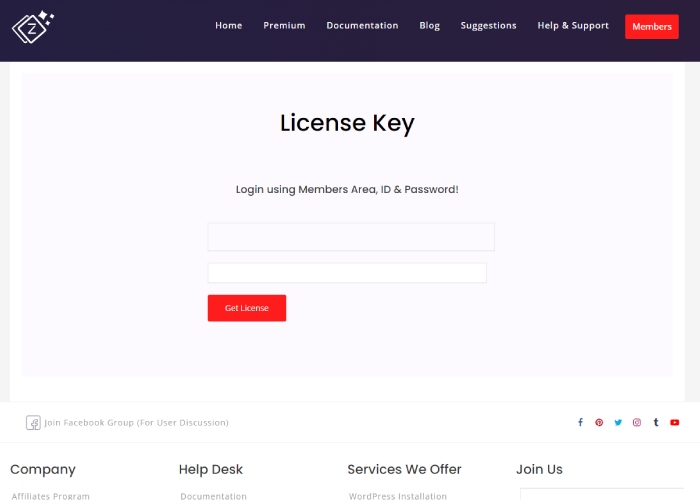
You need to enter a license key to activate.
Input the license key here ↴

You can now observe that our Zita Site Builder Pro has been successfully activated.
You can also watch this video tutorial.
Step 5: Choose the design for the Auto parts:
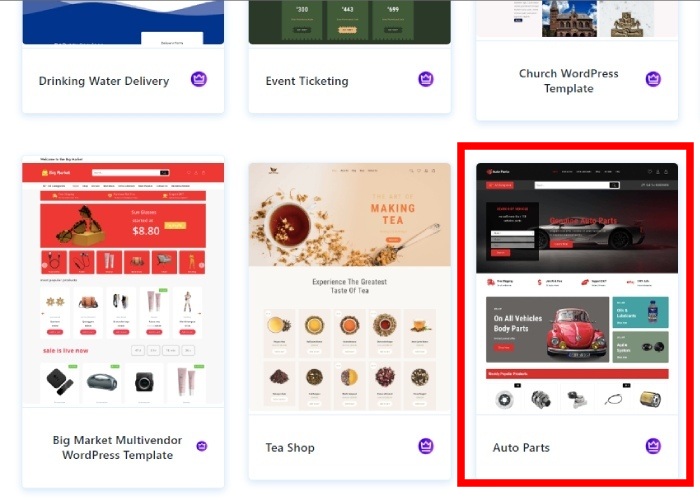
Select the design that aligns with your preferences. Furthermore, you have the option to utilize a Page Builder tool to personalize your site. For instance, I have chosen Elementor. Going forward, your site will be customized using the Elementor Page Builder.
Step 6: Proceed by clicking on Continue.

Here is a preview of how your website will appear. After completing the setup, your website will mirror this preview. If you are satisfied with the appearance, click “Continue” to move forward. Otherwise, you can click “Back” to explore alternative design options.
Step 7: Review these points and then click on “Build My Website”.
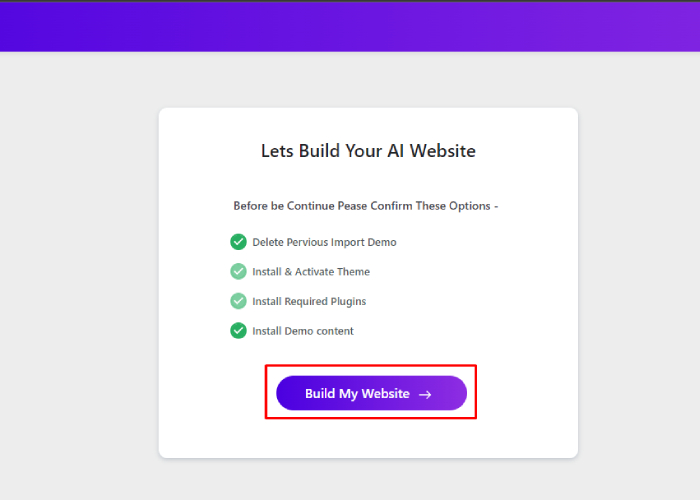
You have reached the final stage of creating your website. Please review the points and deselect any options you do not want before proceeding. Your website will be completed in just a few seconds.
Step 8: Choose “Customize” or “View Website”
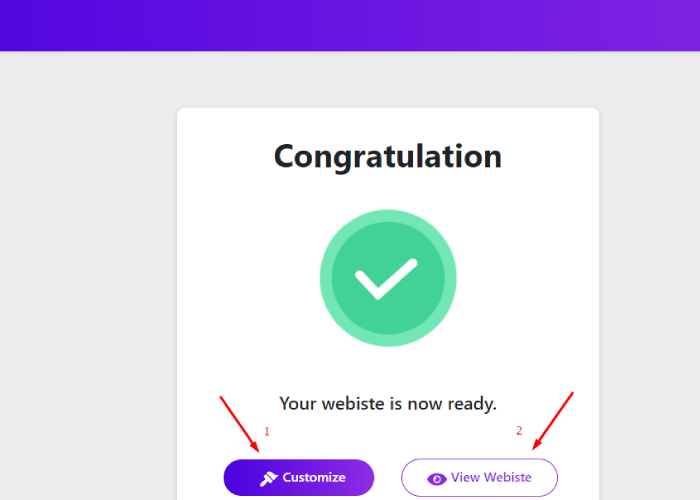
After making desired changes to your WordPress website.
There are 2 options:
- navigate to the top toolbar and select “Customize” to access the customization options. Alternatively, choose “View Website” to preview your website with the implemented changes in real time. This step allows you to visually inspect and fine-tune your website’s appearance and functionality before publishing it to your audience.
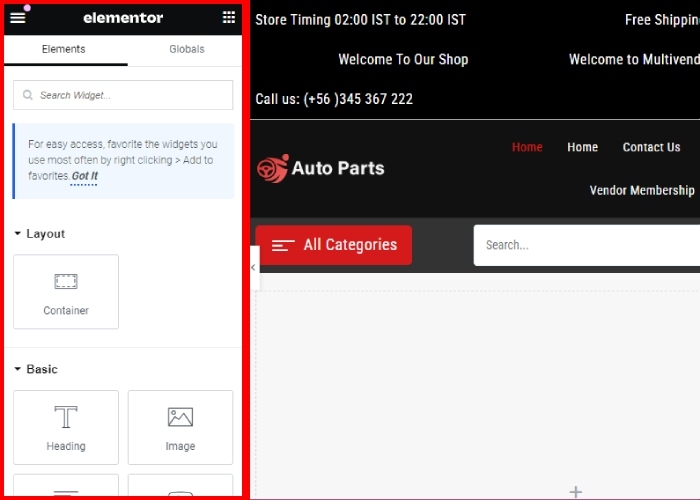
2. When you click on “View Website,” you’ll be taken to your live website, where you can observe your “Auto parts store” in action.
Your website is ready

In only 5 simple steps, we have created a new website for Auto parts. This process demonstrates how easily you can build more websites using the same method.
FAQ:
Q: What are the essential steps to create an auto parts website in WordPress?
Ans: To create an auto parts website in WordPress, you can follow these essential steps:
1. Choose a reliable web hosting provider and domain name.
2. Install WordPress and select a suitable theme for your auto parts website.
3. Customize the website with relevant plugins and features for e-commerce functionality.
Q: How can I showcase auto parts effectively on my WordPress website?
Ans: To showcase auto parts effectively on your WordPress website, you can use high-resolution images, and detailed product descriptions, categorize products for easy navigation, and consider implementing a search function and filters for a seamless user experience.
Q: What are some important security measures for an auto parts website in WordPress?
Ans: Important security measures for an auto parts website in WordPress include using SSL certificates for secure transactions, regularly updating WordPress and plugins, implementing strong password policies, and using security plugins such as Wordfence or Sucuri.
Q: What are some recommended plugins for an auto parts website in WordPress?
Ans: Some recommended plugins for an auto parts website in WordPress include WooCommerce for e-commerce functionality, Rank math for search engine optimization, Lead Forms Builder for creating contact forms, and UpdraftPlus for website backups.
Conclusion:
In conclusion, creating an auto parts website in WordPress is a manageable task with the right approach and tools. By following step-by-step guides and utilizing WordPress themes and plugins specifically designed for e-commerce, individuals can easily set up an attractive and functional website to sell auto parts online.
With WordPress’s user-friendly interface and extensive customization options, even those without coding experience can create a professional-looking website tailored to their needs. Additionally, leveraging SEO techniques and integrating payment gateways can help optimize the website for better visibility and seamless transactions.
Overall, building an auto parts website in WordPress empowers individuals to showcase their products effectively and reach a broader audience in the competitive online marketplace.
See more: