

Did you know that having a website can make you more than 20% profit? It is true that online stores open up so many opportunities to earn. It not only includes online selling but also advertising, referrals, and affiliate marketing, etc.
In this digital world, building a website and launching it has become super easy. WordPress and WooCommerce have made building a website easy and flexible.
We chose WooCommerce because it easily manages products, payments, shipping, and customer orders all from one platform.
In this blog, I will guide you through how you can build your website, add products, launch, and much more. It doesn’t require lots
Intro: Benefits of WordPress + WooCommerce
If we talk about benefits, it will create a long list. Here are some of them
- Cost-Effective– WordPress is an open-source platform, which means it is free to download and use. Users only need to pay for hosting and domain names. WooCommerce is a free plugin that can transform a WordPress website into a fully functional online store. WooCommerce one of the most affordable solutions for starting and running an online business.
- Flexibility – WordPress offers extensive customization options through thousands of themes and plugins. WooCommerce allows store owners to customize every aspect of their online store, including product pages, checkout process, shipping options, and payment gateways.
- Beginner Friendly – WordPress is known for its user-friendly dashboard and simple interface. Even beginners can easily create pages, publish blog posts, upload images, and manage website content without technical knowledge. WooCommerce integrates directly with WordPress and provides a simple interface for managing an online store. Users can easily add products, set prices, manage inventory, track orders, and update product information.
- SEO Friendly – WordPress is designed with search engine optimization in mind. Clean code, customizable permalinks, and SEO plugins such as Yoast SEO or Rank Math help improve search rankings. WooCommerce benefits from WordPress’s SEO capabilities and allows users to optimize product pages, categories, and descriptions for search engines.
- Scalability – WordPress can grow with your website. It works for small personal blogs, company websites, and even large enterprise platforms with millions of visitors. WooCommerce is highly scalable and can support small online shops as well as large eCommerce businesses with thousands of products.
- Community Support – WordPress has one of the largest communities of developers, designers, and users in the world. This community provides extensive documentation, forums, tutorials, and online resources. WooCommerce also benefits from a large global community. Developers continuously create extensions, themes, and integrations to enhance store functionality.
- Security – WordPress regularly releases updates to improve security and fix vulnerabilities. With the help of security plugins, SSL certificates, and strong hosting providers, users can protect their websites from threats. WooCommerce supports secure online transactions and integrates with trusted payment gateways that follow strict security standards.
- Analytics & Reportb – WordPress can integrate with analytics tools such as Google Analytics to track visitor behavior, traffic sources, and website performance. WooCommerce includes built-in analytics and reporting tools that help store owners track sales, revenue, orders, customer behavior, and product performance.
Step 1: Set up WordPress
Let’s move further.
The first thing we need to do is choose a domain. The domain is the address of your website on the Internet. Every website has an address. For example, “Google has google.com and Facebook has facebook.com”.
So first, buy an address for your website. There are some domain name providers that you can consider.
| Serial No | Domain Registrar | Starting Price |
|---|---|---|
| 1 | Namecheap.com | $0.99 |
| 2 | Name.com | $9.99 |
| 3 | Hostinger | $0.99 |
| 4 | BigRock | $1.98 |
Step 2: Install the WooCommerce plugin
After purchasing the domain. Open your WordPress dashboard.
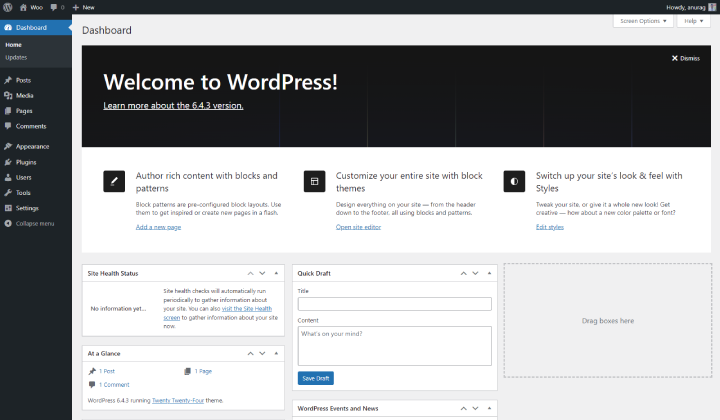
Go to Plugins and click on Add Plugin.

Go to the search bar and search for Woocommerce

Install and activate the plugin.
Step 3: Choose and install a WooCommerce theme
Now open your WordPress dashboard. Click on Appearance and then on Add Theme.
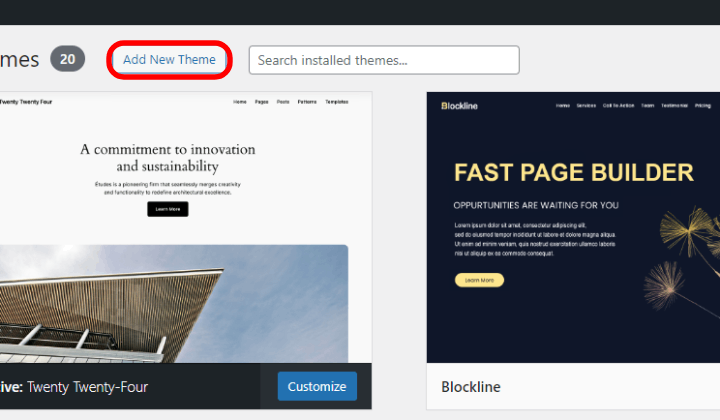
You can install any theme compatible with Woocommerce. Here I am going with Shop Mania as it is fast, responsive, and fully integrated with Woocommerce and all the features required for an online store.
Why I Chose Shop Mania
Shop Mania is one of the fastest WordPress Woocommerce themes. It comes with more than 90 premade templates that cover almost every niche. What I want to say, you can create any type of website using the Shop Mania theme.
Here are some of the templates.
- AI Agents – Built for AI-driven products.
- Flipmart – Create a Flipkart replica website.
- Amaze Mania – Create an exact website like Amazon.
- Essential Oil – Helps to create a website for oil brands or aromatherapy businesses.
- Ceramic Shop – Website for your artwork and ceramics.
Let’s see some of its features –
- Woocommerce Integration – The theme is fully compatible with WooCommerce, allowing users to easily create a professional online store with product pages, shopping carts, and checkout functionality.
- Page Builder Compatibility – The theme works well with popular page builders like Elementor, Beaver Builder, and Gutenberg, allowing users to design pages using drag-and-drop tools without coding knowledge.
- Lightweight & Fast Loading – Shop Mania is built with optimized code and modern technologies to ensure fast loading speeds.
- Search Engine Optimized – The theme is designed with search engine optimization in mind. Clean code structure, fast loading, and SEO-friendly layout help websites rank better in search engines and attract more organic traffic.
- Ajax Experience– It uses AJAX technology for smoother browsing, allowing actions such as filtering or adding products to the cart without reloading the page.
- Customization – It uses AJAX technology for smoother browsing, allowing actions such as filtering or adding products to the cart without reloading. Users can customize many elements, including colors, backgrounds, headers, logos, and menus. These options help businessesf design a website that matches their brand identity. page.
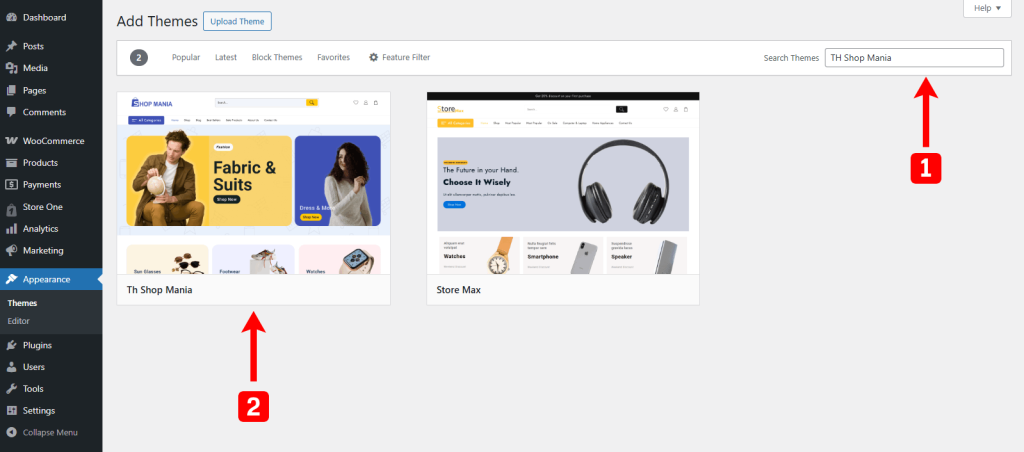
Go to the search bar and search for Shop Mania, and then install and activate the theme.
Go to Appearance and click on Shop Mania Options

Install
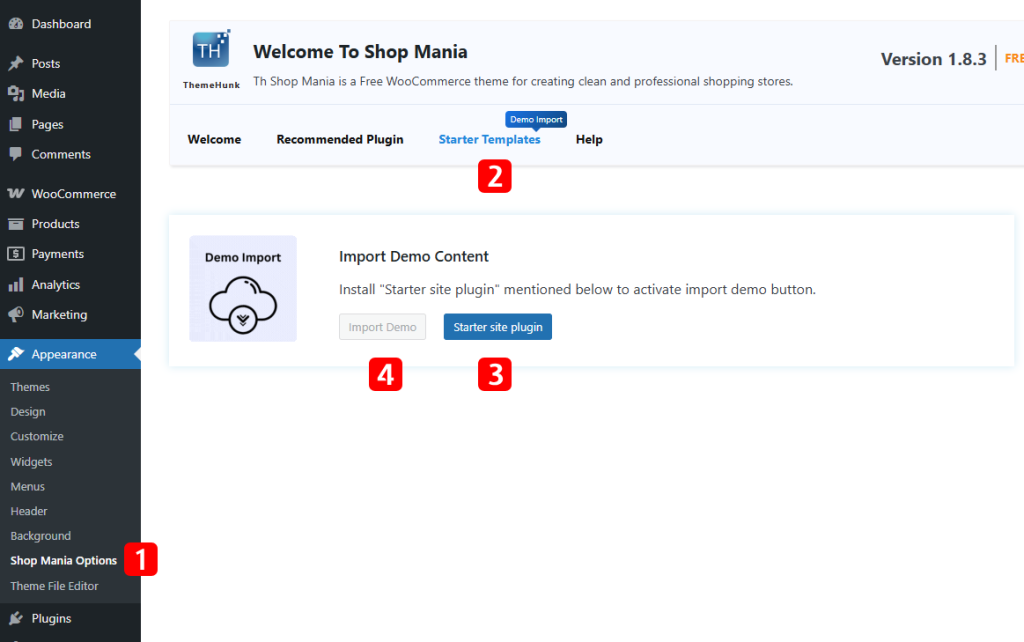
Select the template you want to create your site with.
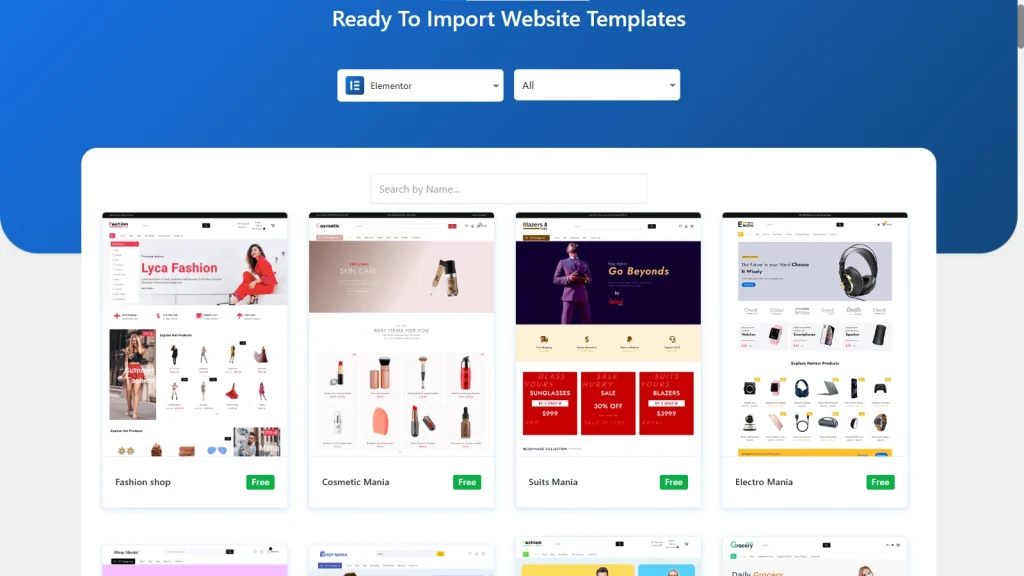
Click on Continue on the next page.
Click on Build My Website

Wait for some time, your site will be ready. After completion, you will have two options.

You can click where you want to head. If you click on Customize, your site will open with Elementor, where you can customize your site with a drag-and-drop builder. Click on View Website to open your site.
This is your website.

Step 4: Add products and set up payment/shipping
Let’s add products to our store. Open your dashboard. Go to Products > Add New Product.
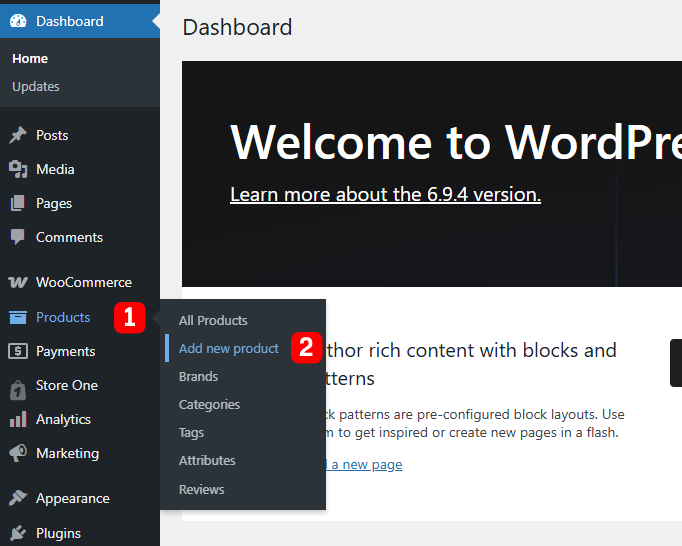
This will open a page where you need to fill in product details.
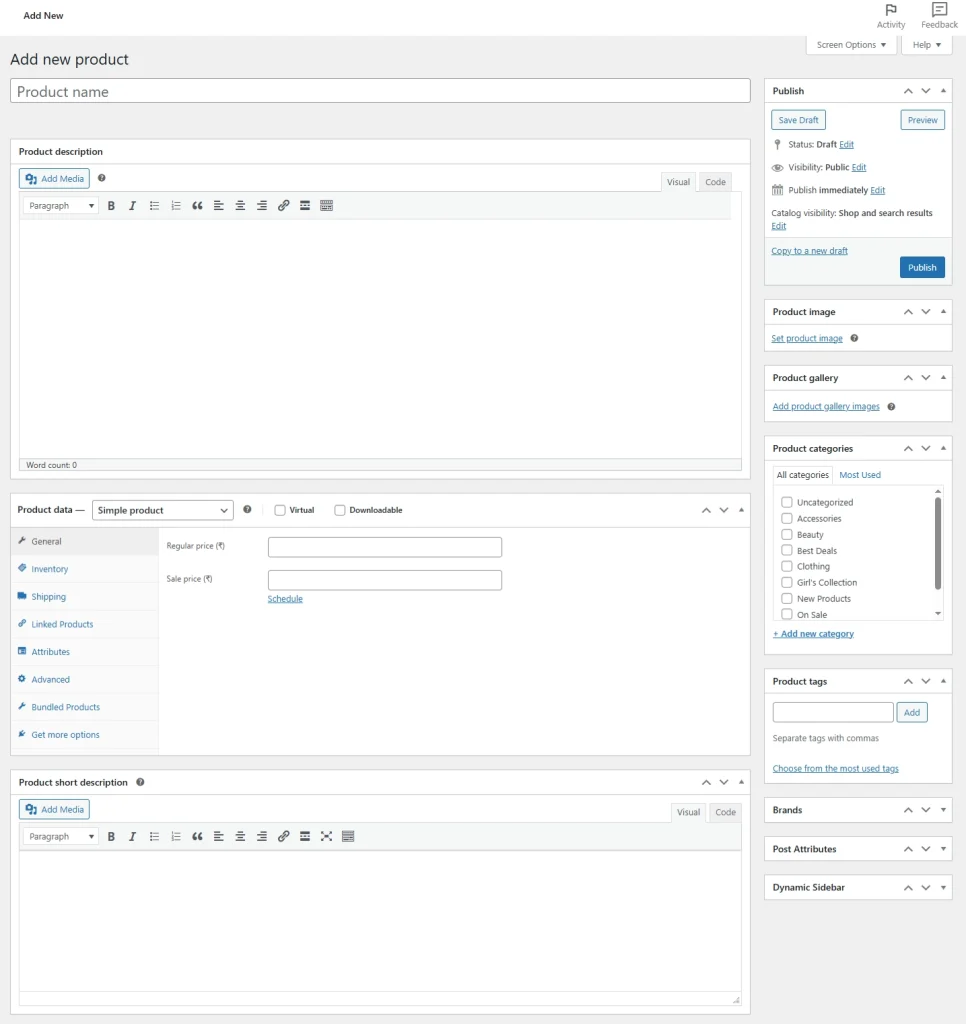
After filling in the required fields, click on Publish.
This will save the Product.
If you already have a CSV file of products, you can import the products in bulk. Simply click on Products and then on the Import button at the top of all products.

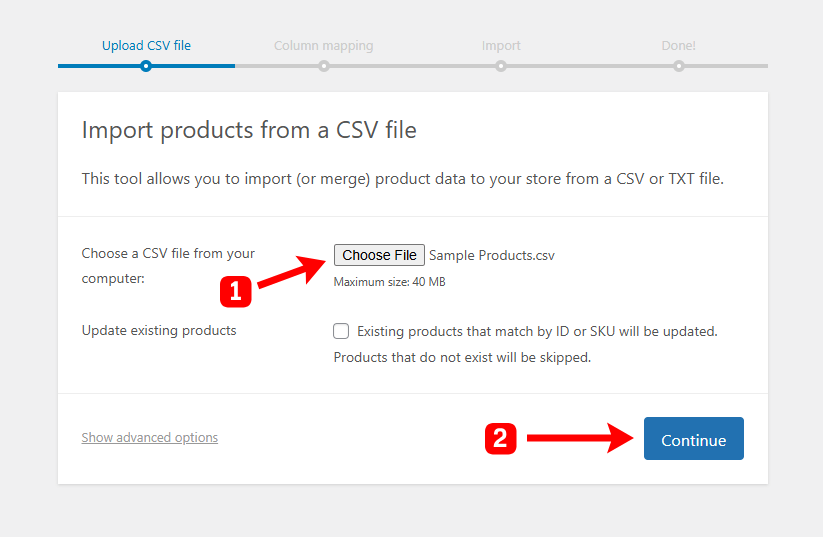
Click on Choose File and upload the file. Then click on Continue. Proceed with the steps, and your product will be imported.
Step 5: Launch and market
After setting up your store, you can launch your website.
All you need to do is market so that more people know about your store and buy from you. Having a website is nothing if you can’t attract customers.
It’s not only marketing, but effective marketing is the thing you need. It is very important that your site reaches the right audience.
There are various ways you can market your online store after launch
- Social Media – Social media is one of the most powerful tools for promoting an online store. Platforms like Instagram, Facebook, and Pinterest allow businesses to showcase products, share updates, and interact directly with potential customers.
- Search Engine Optimization (SEO) – Search engine optimization helps your online store appear in search results when customers look for products similar to yours. By optimizing product descriptions, blog posts, and category pages with relevant keywords, your site can rank higher on search engines like Google. Writing helpful blog content related to your products can also attract organic traffic and establish your store as a trusted source of information.
- Email Marketing – Email marketing remains one of the most cost-effective ways to promote an online store. Encourage visitors to sign up for newsletters by offering incentives such as discounts or exclusive content.
- Collaboration– Partnering with influencers can quickly expand your reach. Influencers on various social media platforms can introduce your products to their followers through reviews, unboxings, or tutorials. Choose influencers whose audience aligns with your target market to ensure authentic promotion and better results.
- Advertisement – Paid advertising can accelerate growth, especially for new stores. Platforms such as Google Ads and Facebook Ads Manager allow you to create highly targeted campaigns based on demographics, interests, and online behavior.
- Encourage Reviews and Testimonials – Customer reviews build credibility and influence purchasing decisions. Encourage satisfied customers to leave reviews and share photos of your products. Featuring this content on your website and social media can help create social proof and attract new buyers.
Tips:
Launching an online store is the beginning of your ecommerce journey. To build a sustainable and successful business, you need to focus on long-term growth, customer satisfaction, and continuous improvement.
The following tips can help you move forward and strengthen your store over time.
- Analyze your Store Data – Use analytics tools such as Google Analytics to track visitor behavior, traffic sources, and conversion rates. Understanding this data helps you identify which products perform well and which marketing strategies bring the best results. Make sure your theme is compatible with the WordPress plugins that you will need before picking it. Although Shop Mania is compatible with almost all WordPress plugins.
- Improve Customer Experience – Ensure that your website is easy to navigate, loads quickly, and works smoothly on mobile devices.
- Keep Testing and Optimizing– Regularly test different marketing campaigns, product descriptions, and pricing strategies.
- Update Posts, Pages, & Products with SEO – Search engines prefer websites that are active, accurate, and regularly maintained. When you refresh your content, it signals that your site is still relevant, which can improve rankings and visibility over time.
- Provide Excellent Support – Good customer support builds trust and improves customer satisfaction. Respond quickly to customer inquiries, provide clear product information, and resolve complaints professionally.
- Collect Customer Feedback – Customer feedback is valuable for improving your online store. Encourage customers to leave reviews and ratings about products and their shopping experience.
- Offer Discount & Performance – Special offers, discounts, and seasonal sales can attract more customers and boost sales. Promotions encourage new customers to try your products and motivate existing customers to make repeat purchases.
- Ensure Website Security – Protecting customer data and payment information is essential for maintaining trust. Use secure payment gateways, SSL certificates, and regular website updates to keep your store safe. Strong security measures help prevent cyber threats and ensure that customers feel confident when shopping on your website.
Conclusion
So you just launched your online store and extended your limits. Building a successful online store is not a one-time effort but an ongoing journey.
It might seem complicated at first. But with tools like WordPress and Woocommerce, it is much easier. Needless to mention, just because you imported a premade template and created your site, it doesn’t mean you can’t customize your site. The site is yours, and customize it in your way. From header to footer, you can edit any section.
In this guide, we walked through every step from registering a domain and choosing hosting to installing WordPress, setting up WooCommerce, adding products, and finally launching your store.
Each step plays an important role in building a store that is secure, easy to manage, and ready to attract customers.