

Are you passionate about footwear and dream of owning your shoe store website? Well, guess what? It’s easier than ever to make that dream a reality with the help of WordPress!
Creating a shoe store is now easier than ever before. With the multitude of site builders available online, anyone can create a professional website without coding. All you need is the right tool.
The process is simple and requires no technical knowledge or coding skills. Zita Site Builder offers a variety of designs for you to choose from, allowing you to customize your site to fit your specific needs.
Once your shoe store website is built, you can easily personalize it using the page builder. Simply replace the dummy data with your own, and your website will be ready to go live. The ease and speed of this process will surely impress you.
In this blog post, I will introduce you to an incredible site builder called Zita Site Builder. This user-friendly tool can have your shoe store website up and running in just 2 minutes.
How to create a Shoe Store website using Zita Site Builder:
Introducing Zita site builder – Zita is a WordPress theme builder that allows users to create custom websites without coding. It offers a range of design options, including layout settings, typography controls, and color customization.
With Zita, users can easily build professional and responsive websites using its intuitive drag-and-drop interface.
Some of the key features of Zita Site Builder include:
- Drag-and-drop interface: Zita allows users to easily build and customize their websites using a simple drag-and-drop interface, making it accessible for users with varying levels of technical expertise.
- Responsive design: The builder enables users to create websites that are optimized for viewing on desktops, tablets, and mobile devices, ensuring a seamless user experience across different platforms.
- Customization options: Zita offers a wide range of design options, including layout settings, typography controls, color customization, and pre-designed templates, allowing users to create unique and visually appealing websites.
Let’s create a Shoe store website with Zita:
By following these steps, you can create your website in no time.
Begin by logging in with your credentials and accessing the dashboard first.
Step 1. Navigate to ‘Plugins’ and click on ‘Add new plugin’.

On your dashboard, hover the cursor on Plugins and click on Add New Plugin.
Step 2. Search for ‘Zita site builder’ and go to ‘Install now’ and then ‘Activate’.

In the search bar, Search for Zita Site Builder and install the plugin. After installation activate it.
Step 3. Navigate ‘Zita site builder’ & Click on Create My website

To access the site builder, simply locate it in the menu and click on it. Then, select “Create My Website” to begin building your site with Zita Site Builder.
After selecting & Clicking on “Create My Website” the next page will be displayed in front of you, containing various styles and theme designs you can choose from.

Some designs are free and some are premium. If you want to access the premium templates then you will have to get the premium version.
Step 4. Upgrade the Zita site builder to pro
Let’s understand the upgrading process of Zita Site Builder.
Here are some simple steps for upgrading the Zita site builder to pro
- Look at the top right corner you can see the ‘UPGRADE TO PRO’ button click on it.

2. After clicking on ‘Upgrade to pro’ this will reach you to the Wpzita site you have to scroll down. Now choose your preferred plan and proceed.

3. After completing the Purchasing process you have to go to your Dashboard.
4. If you have a plugin in a .zip format, then upload the plugin and install and activate it.

After activation, you will have to insert a license key to activate the pro version of the Site Builder.
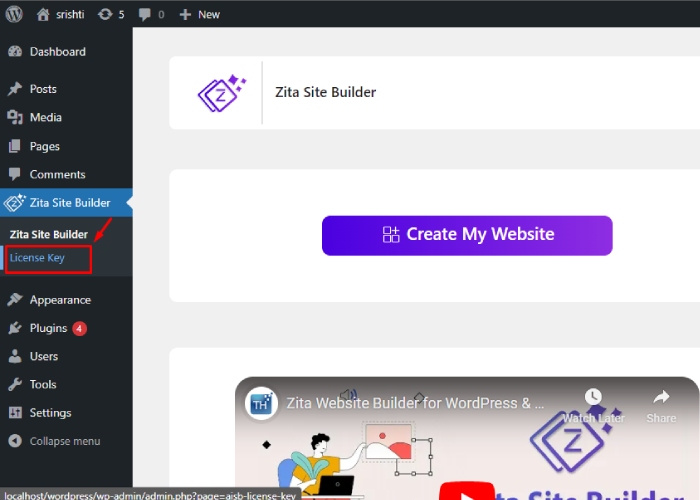
5. Click on License Key
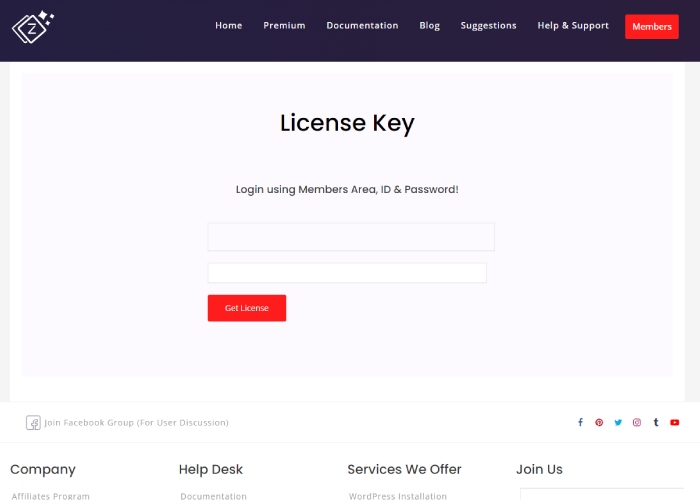
6. You have to Enter License key for Activation.

7. If you don’t have a license key then click on Find Your License Key next to the Activate button.
8. Login and get the License Key.
You can also watch this video tutorial for some help.
You can see here our Zita site builder Pro is now Active.

Step 5. Select the design for the Shoe Store
You can filter the template according to page builder and category from here. Later the template will be customized with the page builder that you will choose here.
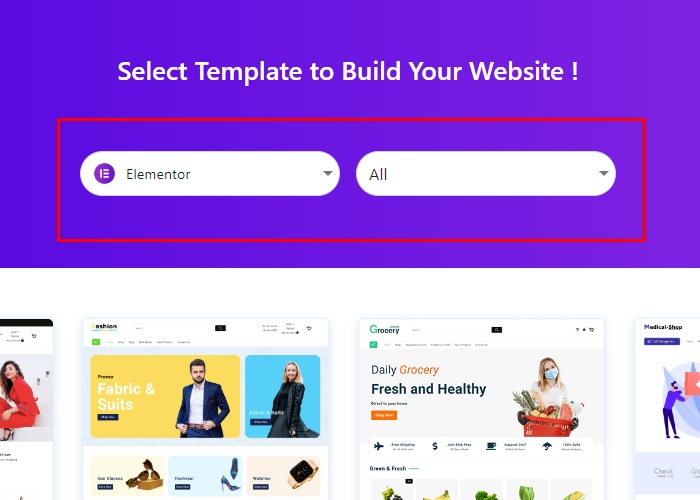

There are lots of premade designs that you can choose from. Choose the design that you prefer.
Step 6. Click on ‘Continue’.

Here is a preview of your website. Your completed website will look like this page. If you are satisfied, click on continue. Otherwise, click on Back and select a different design.
Step 7. Check these points and click on Build My Website.
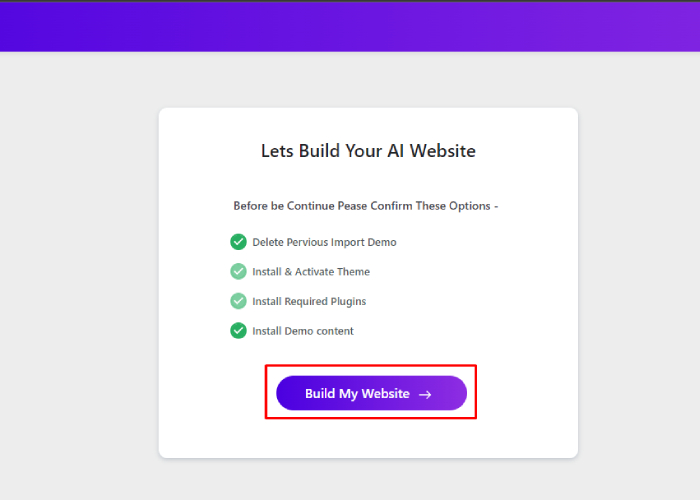
The website is almost ready! Review the following points and unselect any if necessary before proceeding. Your website will be completed in just a few seconds.
Step 8. Click On Customize Or View Website
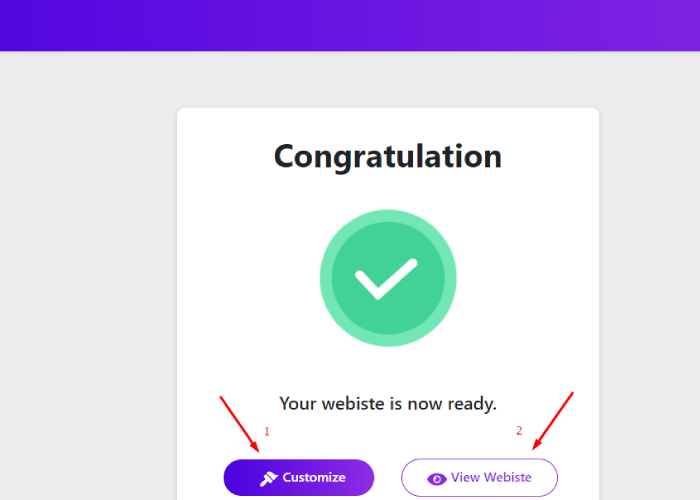
You have 2 choices:
1. If you choose Customize, you will be directed to the customization page where you can personalize the website to your liking using the page builder of your choice, such as Elementor.

Once you have finished customizing the site, click on update and then return to click on View Website.
2. Upon clicking the View Website option, your live website will be displayed.
“Your website is all set and ready to go.”

In just 5 simple steps, you have witnessed the creation of a new website for a fashion store. This is the blueprint for building more websites. Happy Creating!
FAQ
Q: What are the essential features of a Shoe Store website in WordPress?
A: User-friendly navigation, high-quality product images, secure payment gateways, responsive design, social media integration, customer reviews, inventory management, and SEO optimization.
Q: How can I promote my Shoe Store website in WordPress?
A: Utilize social media marketing, email campaigns, influencer collaborations, discounts, loyalty programs, SEO strategies, and participation in industry events.
Q: What are the best practices for managing inventory on a Shoe Store website in WordPress?
A: Best practices involve regular product availability updates, utilization of inventory management tools, offering backorders or pre-orders, providing diverse product options, optimizing shipping processes, and conducting routine inventory audits.
Conclusion
Creating a shoe store website in WordPress can be an advantageous venture, given the increasing trend of online shopping. With the right design, user experience, and marketing strategies, a WordPress website can effectively showcase and sell a wide range of footwear.
Zita Site Builder simplifies website creation, turning it into a matter of minutes. Coding is unnecessary, thanks to clear, straightforward steps. These features make Zita Site Builder stand out. In case of confusion, comprehensive documentation and support are available.
Upgrading to Zita Site Builder Pro unlocks additional options and enhances the user experience.
Additionally, integrating secure payment gateways and ensuring seamless navigation can contribute to a successful online presence.
Overall, creating a shoe store website in WordPress requires a comprehensive approach that considers both the technical and business aspects of e-commerce.
See more-