

If you are passionate about owning your multivendor e-commerce website, you can now make that dream a reality with WordPress!
It has never been easier to create a multivendor e-commerce website. With a variety of site builders available online, anyone can create a professional website without needing to know how to code; all you need is the right tool.
In this article, we will introduce you to one of the best—Zita Site Builder—which is a user-friendly tool that can have your multivendor e-commerce website up and running in just two minutes without requiring any technical knowledge or coding skills.
How to create a Multivendor ecommerce website using Zita Site Builder:
Introducing Zita Site Builder: Revolutionize Your Website Creation Effortlessly!
Zita, the innovative WordPress theme builder, empowers users to craft bespoke websites effortlessly, sans the need for coding expertise.
Boasting a plethora of design features such as layout settings, typography controls, and extensive colour customization, Zita paves the way for unparalleled website customization.
With Zita, constructing professional-grade and responsive websites is a breeze, thanks to its user-friendly drag-and-drop interface.
Key Features of Zita Site Builder:
- Intuitive Drag-and-Drop Interface: Zita simplifies the website-building process with its intuitive drag-and-drop interface, catering to users of all skill levels.
- Responsive design: The builder enables users to create websites that are optimized for viewing on desktops, tablets, and mobile devices, ensuring a seamless user experience across different platforms.
- Customization options: Zita offers a wide range of design options, including layout settings, typography controls, colour customization, and pre-designed templates, allowing users to create unique and visually appealing websites.
Embark on Your Website Creation Journey with Zita: Let’s Design a Multivendor eCommerce Website!
These steps will help you create your website quickly and easily.
To begin, please access your dashboard.
Step 1. Navigate to ‘Plugins’ & Click on ‘Add new plugin’.

To add a new plugin, first go to your dashboard and hover your cursor over the “Plugins” option. Then click on the “Add New” plugin button.
Step 2. Search for ‘Zita site builder’ & go to ‘Install now’ and then ‘Activate’.

In the search bar, search for Zita Site Builder and install the plugin. After installation activate it.
Step 3. Navigate ‘Zita site builder’ & Click on Create My website

To access the site builder, you can find it in the menu and click on it. Then, select “Create My Website” to start building your website using Zita Site Builder. Once you click on “Create My Website,” the next page will be displayed with various styles and themes that you can choose from to design your website.
After selecting & Clicking on “Create My Website” the next page will be displayed in front of you, containing various styles and theme designs you can choose from.

Some designs are free, and others are premium. To access the premium templates, you’ll need to upgrade to the premium version.
Step 4. Upgrade the Zita site builder to pro
Let’s understand the upgrading process of Zita Site Builder.
I can help you with some easy steps to upgrade your Zita site builder to the pro version.
- Click on the ‘Upgrade to Pro’ button located at the top right corner.

2. After clicking on ‘Upgrade to pro’ this will reach you to the Wpzita site you have to scroll down. Now choose your preferred plan and proceed.

3. Once you have finished the purchasing process, you need to navigate to your dashboard.
To support custom vendor pricing models—such as tiered bulk discounts, role-based pricing, or time-based promotional offers—the ELEX WooCommerce Dynamic Pricing and Discounts Plugin is an ideal addition. It enables automated, flexible pricing rules tailored to different vendor roles, translating into enhanced profitability and a better vendor experience.
4. If you have a plugin in .zip format, upload, install, and activate the plugin.

The pro version of the Site Builder must be activated by inserting a license key after activation.
5. Click on License Key
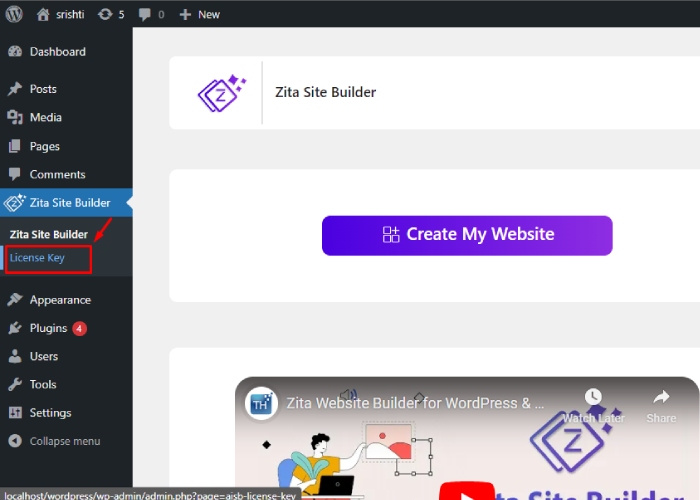
6. Please note that you need to enter a license key in order to activate the software.

7. If you do not have a license key, click on “Find Your License Key” next to the “Activate” button.
8. Login and get the License Key.
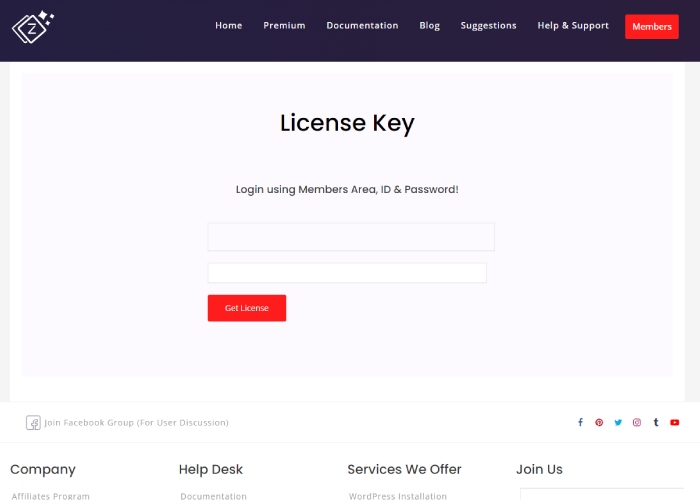
You can also watch this video tutorial for some help.
Our Zita site builder Pro is now active. You can see it here.

Step 5. Select the design for the Multivendor eCommerce Website
You can filter templates by page builder and category here. Once selected, the template will be customized accordingly.
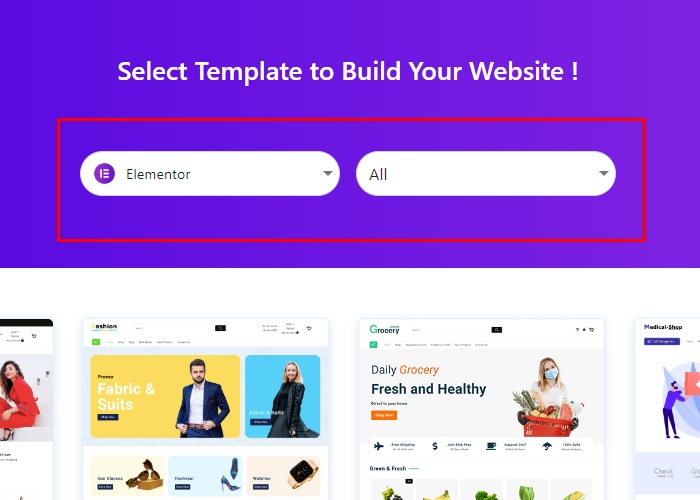

Select the design you prefer and consider using a Page Builder for customization. I have chosen Elementor to edit the site later on.
Step 6. Click on ‘Continue’.

Preview your website before publishing. Choose a design you like and continue. Go back and select another design if you’re not satisfied.
Step 7. Check these points and click on Build My Website.
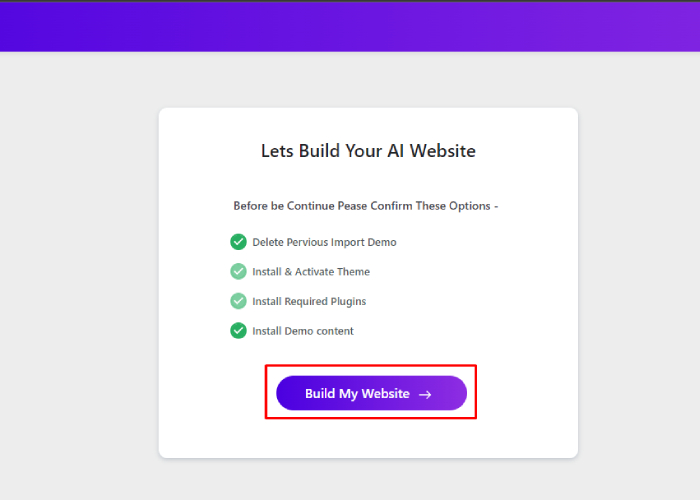
The website is almost ready! Review the following points and unselect any if necessary before proceeding. Your website will be completed in just a few seconds.
Step 8. Click On Customize Or View Website
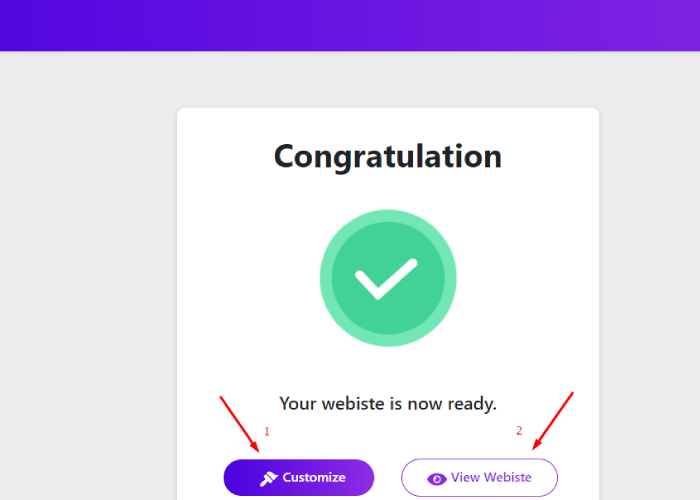
You have 2 choices:
1. If you select Customize, you will be taken to the customization page where you can personalize the website to your preferences using your chosen page builder, like Elementor.

After customizing the site, click on “update” and then return to click on “View Website”.
2. After clicking on the “View Website” option, your website will be displayed in real-time.
“Your website is all set and ready to go.”

In just five simple steps, you can create a new website for your Multivendor store. Follow this blueprint to build more websites.
FAQ
Q: What is Zita site builder?
A: Zita is a WordPress theme and site builder that offers a user-friendly interface for designing and customizing websites without the need for coding knowledge.
Q: Is Zita suitable for beginners with limited technical skills?
A: Yes, Zita is designed to be beginner-friendly, offering a range of pre-designed templates and customization options that are easy to navigate and implement.
Q: What are the key features of Zita that make it suitable for Multivendor eCommerce websites?
A: Zita offers features such as customizable layouts, responsive design, integration with popular eCommerce plugins, and the ability to create vendor-specific storefronts, making it well-suited for Multivendor eCommerce setups.
Q: Does Zita provide support and updates for ongoing website maintenance?
A: Yes, Zita offers support and regular updates to ensure the continued functionality and security of websites built using the platform.
Conclusion
Creating a Multivendor eCommerce website using Zita site builder offers a user-friendly and efficient way to establish a robust online marketplace. By leveraging the customizable features and intuitive interface of Zita, entrepreneurs and businesses can design and build a platform that empowers multiple vendors to showcase and sell their products.
The process involves careful planning, thoughtful customization, and rigorous testing to ensure a seamless and secure experience for vendors and customers.
Zita’s flexibility and versatility enable users to craft a visually appealing and functional website that caters to the specific needs of a Multivendor eCommerce setup.
Embracing innovation, user-centric design, and efficient functionality will be crucial in creating a successful Multivendor eCommerce website using Zita Site Builder. With the right approach and a commitment to excellence, entrepreneurs can capitalize on the potential of Zita to create a thriving online marketplace.
See more-